
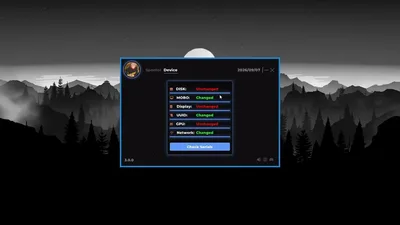
HWID Spoofer vs Account Sanctions: What Changes and What Does Not
Understand hardware identifier changes, the included cleaner and why they do not remove an account sanction or prove the cause of a login failure.
First identify which problem you are describing
An account sanction concerns the account. A hardware restriction concerns identifiers associated with a machine. A failed login alone does not establish which situation applies. It is important to keep those descriptions separate before deciding that a hardware utility is relevant to the problem.
The standalone HWID Spoofer changes listed hardware identifiers and includes trace cleanup. It does not reverse an active account sanction. This guide explains that product scope without promising that a new identifier resolves every error or allows access to every title.
What the identifier utility lists
The product lists changes to disk serials, MAC addresses, GPU identifiers and related hardware fingerprints. Those are machine-related fields. An account's status is a different part of the issue, so changes to those fields should not be described as editing the account record or removing its history.
The utility's published coverage names several anti-cheat families. A family name is not proof that every game using it, or every current version of that game, is covered. Confirm the exact title and build rather than turning a general list into an unrestricted compatibility claim.
Why a cleaner does not replace diagnosis
A trace cleaner is included with the utility. Its presence tells you that cleanup is part of the documented workflow; it does not tell you why a particular account or game client is refusing access. Nor does it make an unsupported title compatible with the utility.
Follow the current guide for the order of identifier changes and cleanup. Do not use an unrelated sequence from a discussion as if it were the product's instructions. Keep a note of the exact error and the stage at which it appears so a support request describes an observable problem.
Prepare the supported Windows environment
The utility lists 64-bit Windows 10 or 11, administrator rights and a stable internet connection for activation and updates. HVCI and Core Isolation stay enabled in Windows, with TPM and Secure Boot enabled in firmware. These requirements belong to this particular listing.
Meeting those requirements does not establish the cause of a game restriction or guarantee an account outcome. If a required setting cannot be enabled, or your Windows environment differs, clarify the mismatch before making changes. Avoid treating a hardware utility as a general remedy for any failed sign-in.
Keep ROB RUN compatibility separate
HWID Spoofer is a standalone utility in this catalog. ROB RUN compatibility is not established, and the product is not listed as a bundled ROB RUN feature. The documented supporting dependency for Rob Run Cheats is Cloud DMA, which serves a different purpose.
The product catalog separates the main software, its supporting environment and standalone utilities. Compare those scopes rather than assuming that every item on a storefront is required for the same game. A utility should be selected for an explicitly supported task.
What to include when asking for help
Use the existing support page and describe the product, exact title, Windows version, error text and when the error occurs. If you have an account notice, distinguish its wording from your interpretation of the problem. That gives a more useful starting point than stating that a spoofer must be needed.
This guide does not provide ban evasion guarantees or alter any game's account rules. The useful distinction is narrower: the listing changes hardware identifiers and provides cleanup, while an account sanction remains a separate matter. Confirm the current supported scope before using the utility.