
Rob Run Cheats for Steam
Tune your view of Looty Bay with role filters, vehicle readouts and loot markers. Adjust aimbot and triggerbot separately, and use Battle Mode to reduce labels in combat.
Product Overview
At a glance
Key capabilities
The short list for Rob Run Cheats, before the full module list.
Another 7 options are in the full list below.
Overview
Rob Run Cheats: aim, visuals and world information
How the aim tools, visuals and world markers work together in ROB RUN.
Rob Run Cheats puts player roles, vehicle details and world markers in one configurable overlay for ROB RUN on Steam. In Looty Bay, that means distinguishing a cop from a civilian, checking whether a nearby car is occupied and narrowing loot markers to the items you want.
Aimbot and triggerbot provide separate targeting controls. Radar maintains a wider view, while Battle Mode hides world labels during combat. The Config System saves your choices. Windows 10/11 and Cloud DMA are required; the requirements section lists the Windows security settings.
Choose which information stays visible as your session changes from travel to heists or combat. The player, vehicle and world groups have separate filters, so you can build a readable display around the task in front of you.
Save settings for your next session
The Config System stores and reloads menu settings. Custom menu and panic keys keep the controls accessible, while Battle Mode provides a separate view for fights.
Aimbot
Choose an aim key and a forced aim key, then select Head, Neck, Chest, Pelvis or Closest as the target bone. Closest and Crosshair priorities decide how targets are selected. Separate role filters cover cops, robbers, civilians and NPCs; you can skip dead, knocked, in-vehicle and teammate or clan targets.
In Scope Only, Visible Check and Lock Target refine when aiming applies. Max Aim Distance and Target Switch Delay limit range and switching. FOV, Adaptive FOV and Smooth adjust the aim area and movement. Draw the FOV border, background and locked target, or hide the FOV circle in Battle Mode.
Triggerbot
Set a separate trigger key and choose Hold or Toggle. Head, Body and Legs hitboxes can be selected, with hitbox scale, reaction delay and maximum trigger distance. Visible-only targeting and exclusions for dead, knocked, in-vehicle and clan targets give you control over which crosshair encounters trigger a shot.
Player ESP
See players through walls using Full, Corner, 2D or 3D boxes, optional fill, a skeleton and a head circle. Health bars and text sit alongside armor or shield, name or alias and clan tags. Role labels distinguish Criminal, Cop, Civilian and NPC; a police highlight and wanted or heat state add context.
Show held weapons or items, shooting, running, reloading, arrested and downed states, plus vehicle occupancy. Snaplines, off-screen arrows and an aim-at-you indicator add awareness. Separate visible and hidden colors, distance fading, a maximum player distance, Plain or Background style, hide-team controls, NPC markers and corpse markers help manage the display.
Glow / Chams
Choose Outline, Fill or Combined styling. Set a glow color and a separate police color, enable material chams and limit the maximum glow distance. This group changes player highlighting, while Player ESP handles labels and readouts.
Vehicle ESP
Check vehicle name, distance, owner or free status and locked or unlocked state. Health, fuel, speed, engine and cargo readouts provide more detail before you approach. Filter empty or occupied vehicles and Police, Robber, Civilian or Unowned roles. Choose 2D or 3D boxes, show garage and spawn markers, hide your own vehicle and set a maximum distance.
World and Loot
Mark dropped items and cash, item icons and prices, loot bags, containers and cargo. Category filters cover weapons, ammo, armor, medicine, keys, tools and valuables. A minimum value filter hides lower-value items. Safes, workbenches, hideout entrances, territory and capture points, heist objectives and NPC traders or vendors have their own markers.
Cameras and Security
Locate cameras, including broken or disabled ones, and show their coverage cones. Guard posts, alarms, security panels, doors, vault doors and medical cabinets are also marked. These readouts help you inspect the security objects around a heist area without suggesting a fixed route or guaranteed outcome.
Banks and Roulette
Show banks, roulette spots, cash nodes, withdrawal points, cash charging points and ATMs. Keep the economy markers relevant to your route, rather than displaying every world category at once.
Bases
Read the base owner or clan, buildings and outbuildings, raid state and raid lock timer. Base ESP also covers defense blocks and modules, workbenches and their timers, money laundering, cargo opening and exchange, and the crypto farm. Hide your own base when you only need other locations.
Radar
The 2D radar combines distance rings and an FOV cone with adjustable range, size and zoom. Auto zoom and off-screen indicators help retain context around the radar boundary. Display players, vehicles, loot, cameras, hideouts, objectives, banks and roulette; game map markers and a player list are supported.
Battle Mode
Toggle Battle Mode with its own key to hide world labels during combat and keep only enemies visible. A clan battle side filter narrows the display further. You can also hide the aimbot FOV circle in this mode. Your wider world-marker setup can remain separate from what is shown during a fight.
Misc and Config System
Misc lists No Recoil, Stream-Proof Overlay and Custom Crosshair alongside Custom Menu Key and Custom Panic Key. Save and load settings with the Config System. Stream-Proof Overlay is a listed option; its exact coverage across capture tools is unspecified. No claim is made for particular recording or streaming applications.
Requirements and build changes
Rob Run Cheats supports ROB RUN on Steam with Windows 10 or 11. HVCI, Core Isolation, TPM and Secure Boot must be on. Cloud DMA is required for full functionality on supported builds. Follow current setup documentation for the exact environment and installation sequence.
Features depend on the current Early Access game build and may change after patches. Updates and status notices are available. Review those notices before using a changed client; no detection status, ban protection or permanent compatibility is guaranteed.
Modules
What's included
The full option list for Rob Run Cheats. Each line can be switched in the menu.
- Aimbot: bones, FOV, Smooth and role filters
- Triggerbot: hitboxes, delay and Hold / Toggle
- Player ESP: roles, health, armor and actions
- Glow / Chams: Outline, Fill and Combined
- Vehicle ESP: ownership, locks, fuel and health
- World / Loot: categories and minimum value
- Cameras / Security: cameras and coverage cones
- Banks / Roulette: banks, cash points and ATMs
- Base ESP: owner, raid state and timers
- 2D radar: rings, zoom and player list
- Battle Mode: enemies and clan side filter
- No Recoil and Custom Crosshair
- Config System, menu key and panic key
- Stream-Proof Overlay
Experience
Explore the menu groups
Player and world visuals cover different jobs. Read the feature sections for the available filters and the requirements before setup.
In-game layers
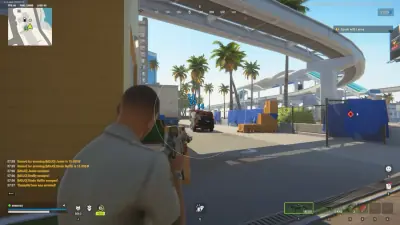
- Layer A
Street encounter
Aiming from cover toward a van, with a FOV circle, target labels and damage numbers visible.
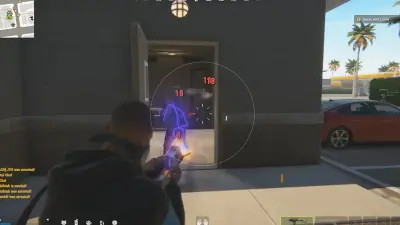
- Layer B
Doorway encounter
A close fight at a doorway shows a skeleton outline, distance labels and a large FOV circle.
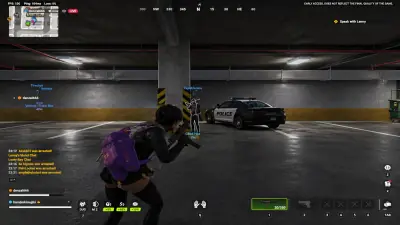
- Layer C
Underground garage
A police car and a marked character sit ahead of the player, with blue labels across the garage.
More products
Pairs well with
Utilities sold beside the cheat. Each one keeps a separate page.
- HWID Spoofer Standalone hardware utility. Changes disk, MAC and GPU identifiers with an included trace cleaner. ROB RUN compatibility is not established. View details: HWID Spoofer
- Cloud DMA Cloud DMA is required for full ROB RUN functionality. Check its own environment requirements before setup. View details: Cloud DMA
- Skin Changer Local weapon finishes, outfits and knife styles in supported titles. ROB RUN compatibility is not established. View details: Skin Changer
FAQ
Questions about this page
Answers for this page. The FAQ page holds the rest.
Blog
Related guides
Explore vehicle ESP and aim controls, check Cloud DMA requirements, and understand what HWID Spoofer and Skin Changer cover.
A practical checklist for Steam, Windows security settings, Cloud DMA and menu configuration before using Rob Run Cheats.
Learn how Player ESP, aimbot exclusions and vehicle roles answer different questions in Looty Bay.
Understand what bank, camera and loot markers tell you without relying on unverified map coordinates.
Read clan ownership, raid lock timers and base activity without treating a marker as a guaranteed raid opportunity.
Learn what occupancy, ownership, lock state and fuel readouts tell you before choosing a vehicle in Looty Bay.
Compare target selection, FOV, Smooth, hitbox scale and reaction delay without relying on unverified best settings.