Outrun, Outplay, Outsmart

Rob Run Cheats

See who is nearby, find a car and spot valuable loot across Looty Bay. Rob Run Cheats brings Player ESP, adjustable aim tools and a 2D radar to ROB RUN on Steam. Requires Windows 10 or Windows 11 and Cloud DMA.

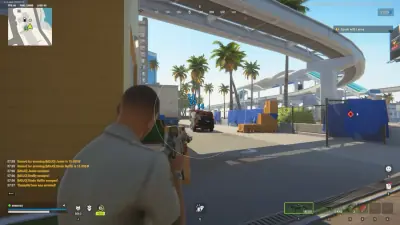
A player aims toward a van beneath an elevated road, with a large FOV circle and labels near the vehicle.

Steam

Game version

10 / 11

Windows

2D

Radar

Cloud DMA

Required

Aimbot
Triggerbot
Player ESP
Vehicle ESP
Loot markers
Base ESP
2D radar
Battle Mode
No Recoil
Config System
Glow / Chams
Windows 10 / 11
ROB RUN
Steam only
HVCI on
Core Isolation on
TPM on
Secure Boot on
Aimbot
Triggerbot
Player ESP
Vehicle ESP
Loot markers
Base ESP
2D radar
Battle Mode
No Recoil
Config System
Glow / Chams
Windows 10 / 11
ROB RUN
Steam only
HVCI on
Core Isolation on
TPM on
Secure Boot on

Features

See players, vehicles and loot

Follow the parts of Looty Bay that matter to your next move. Filter roles, find usable cars and keep heist markers separate from combat information.

Player ESP

Know who is nearby.

Role tags distinguish cops, criminals, civilians and NPCs. Add health, armor and action states to understand what each player is doing.

  • Role and clan tags
  • Health and armor
  • Skeleton and boxes
  • Visible / hidden colors
  • Warning when someone aims at you

Vehicle ESP

Check a car before approaching.

Read ownership, lock state, fuel and health. Filter occupied and empty vehicles or hide your own car.

  • Owner or free status
  • Locked / unlocked
  • Health and fuel
  • Vehicle role filters

Aimbot

Choose your targets.

Set a target bone, aim distance and FOV. Role filters and clan exclusions keep the target selection suited to your session.

  • Aim key and forced key
  • Smooth and Adaptive FOV
  • Visible Check
  • Target Switch Delay

World and loot

Focus on useful finds.

Mark dropped cash, bags and containers. Item categories and a minimum value filter help reduce labels for less valuable items.

  • Weapons and ammo
  • Medicine and keys
  • Item prices and icons
  • Minimum value filter

Bases and heists

Read the area around a job.

Find hideout entrances, territory and objectives. Base ESP adds owner or clan details, raid state and workbench timers.

  • Base owner or clan
  • Raid lock timer
  • Security camera cones
  • Banks and ATMs

2D radar

Keep the wider area in view.

Put players, cars and selected world markers on a radar with distance rings, an FOV cone and adjustable zoom.

  • Range, size and zoom
  • Auto zoom
  • Indicators beyond the screen
  • Player list

Battle Mode

Clear labels during a fight.

Use a dedicated key to hide world labels and keep enemies visible. A clan battle side filter narrows the display.

  • Battle Mode key
  • Show enemies only
  • Hide world labels
  • Clan side filter

Triggerbot

Set when a target triggers fire.

Choose Hold or Toggle, then set hitboxes, reaction delay and range. Visibility and clan filters control which targets count.

  • Head, Body or Legs
  • Hitbox scale
  • Reaction delay
  • Maximum distance

Menu and configs

Keep your controls together.

Save and load settings with the Config System. Change the menu key and panic key to fit your keyboard layout.

  • Save / load configs
  • Custom menu key
  • Custom panic key
  • Custom crosshair

Store

Our products

Explore the ROB RUN menu, its required Cloud DMA layer and the standalone utility catalog.

HWID Spoofer

Hardware identifier changes and an included cleaner.

Standalone hardware utility. Changes disk, MAC and GPU identifiers with an included trace cleaner. ROB RUN compatibility is not established.

  • Disk serial rewrite
  • MAC rewrite
  • GPU ID rewrite

Cloud DMA

A virtual environment on one Windows PC with guided installation and encrypted activation.

Cloud DMA is required for full ROB RUN functionality. Check its own environment requirements before setup.

  • Setup on one PC
  • Guided virtualization setup
  • Encrypted activation

Why us

Rob Run Cheats for the way Looty Bay plays

The menu follows ROB RUN’s roles, vehicles, heist areas and clan bases. These are the documented capabilities to compare when choosing a product.

  • Visuals with role filters

    Separate cops, criminals, civilians and NPCs with role tags, colors and filters.

  • Detailed aim controls

    Choose a bone, FOV, Smooth setting and distance limit, with visibility and clan checks.

  • Vehicle information

    See ownership, lock state, occupancy, fuel and health before heading for a car.

  • Heist and economy markers

    Locate banks, ATMs, safes and security cameras alongside filtered loot.

  • Clan and base tools

    Show clan tags, base ownership and raid lock timers; hide your own base.

  • Saved configurations

    Save and reload menu settings, with separate menu, panic and Battle Mode keys.

Steam

Supported client

The ROB RUN product is for the Steam version.

10 / 11

Windows requirements

HVCI, Core Isolation, TPM and Secure Boot must be on.

Cloud DMA

Required dependency

Needed for full functionality on supported builds.

Setup guide

Prepare your ROB RUN setup in three checks

Start with compatibility, then the required environment, then your menu settings. Use the current setup documentation for installation details.

  1. Check the client

  2. Check the required environment

  3. Configure the display

How it works

From requirements to saved settings.

Check your Steam setup before choosing which information to display.

4 easy steps

  1. 01

    Match the client

    The product supports ROB RUN on Steam and Windows 10/11. Check update and status notices for the current build.

  2. 02

    Prepare Cloud DMA

    Cloud DMA is required for full functionality. Use current documentation for installation and environment requirements.

  3. 03

    Set roles and markers

    Choose the player roles, vehicles and loot categories you need. Limit distances to keep the display readable.

  4. 04

    Save your settings

    Store your choices with the Config System. Review them after updates that change the game or menu.

Blog

Guides and updates

Understand role filters, heist markers, base readouts and the requirements behind the overlay.

A practical checklist for Steam, Windows security settings, Cloud DMA and menu configuration before using Rob Run Cheats.

Learn how Player ESP, aimbot exclusions and vehicle roles answer different questions in Looty Bay.

Understand what bank, camera and loot markers tell you without relying on unverified map coordinates.

FAQ

Questions about this page

Answers for this page. The FAQ page holds the rest.